Claude Code Under the Hood
The concepts I wish I'd known before week one. 8 tools, 200K tokens, hooks as the only deterministic layer, and why config eventually takes 30-50% of your time.
When I started with Claude Code, I spent weeks editing configuration files I didn’t understand. Not because I was careless; I was the opposite, reading documentation carefully, borrowing setups from developers I respected, spending evenings tuning things that didn’t need tuning yet. But I was building on vocabulary I was guessing at, and the gap between what I thought the tool did and what it actually did was costing me more time than I realized.
At some point I stopped and dismantled the docs. Not the glossary, not the quickstart, but the architectural material: the agent loop, the tool catalog, the memory model, the execution semantics. Two days of reading that should have been day one. After that, configuration started making sense.
This is the article I wish had existed before those two days. If this is your first stop with Claude Code, Where to Start is the better entry point: it covers the orientation, the recommended sequence, and why the order matters. This one goes deeper, assuming you’ve already gotten past the vocabulary.
The loop is simpler than it looks
Claude Code runs a loop. You submit a prompt, Claude reasons about it, calls some tools if needed, reads the results, and responds. That is the whole architecture; then the loop repeats.
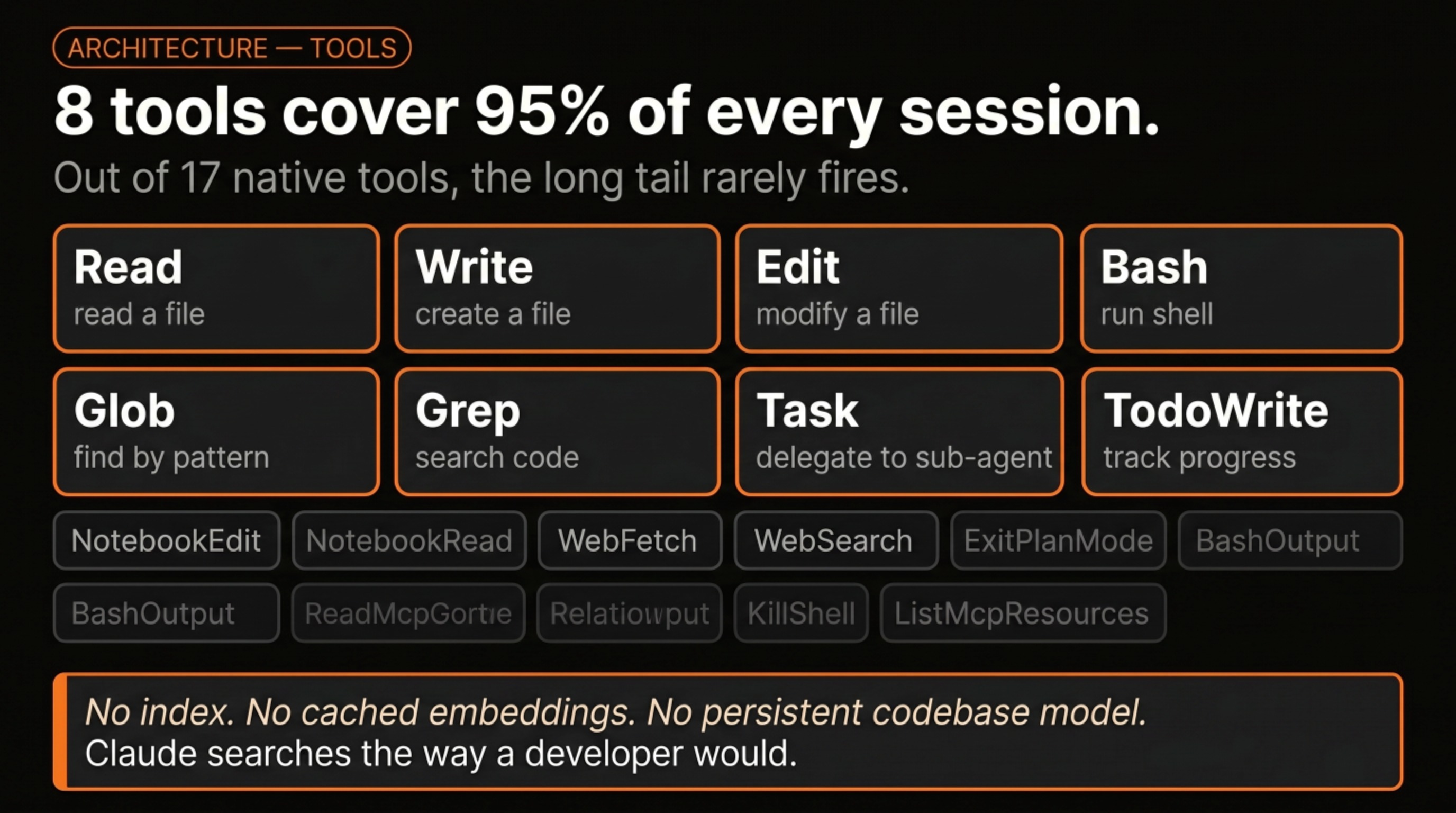
What makes it powerful is the tools available inside that loop. There are around 17 native built-in tools, but eight of them cover roughly 95% of every session: Read, Write, Edit, Bash, Glob, Grep, Task, and TodoWrite. Four tools for touching files, one for running shell commands, one for searching, two for tracking work. No indexing layer, no cached model of your codebase, no background process building up a persistent understanding of your project. Claude finds things the way a developer would: targeted searches and direct reads, nothing cached between sessions.
This matters because it changes what CLAUDE.md is for. There is no index to update between sessions, no incremental model that learns your codebase over time. What Claude knows about your project at any given moment comes almost entirely from what’s in the config files, plus what you’ve told it in the current conversation. The loop starts fresh each time, which is why the config layer carries so much weight.
Memory has three levels
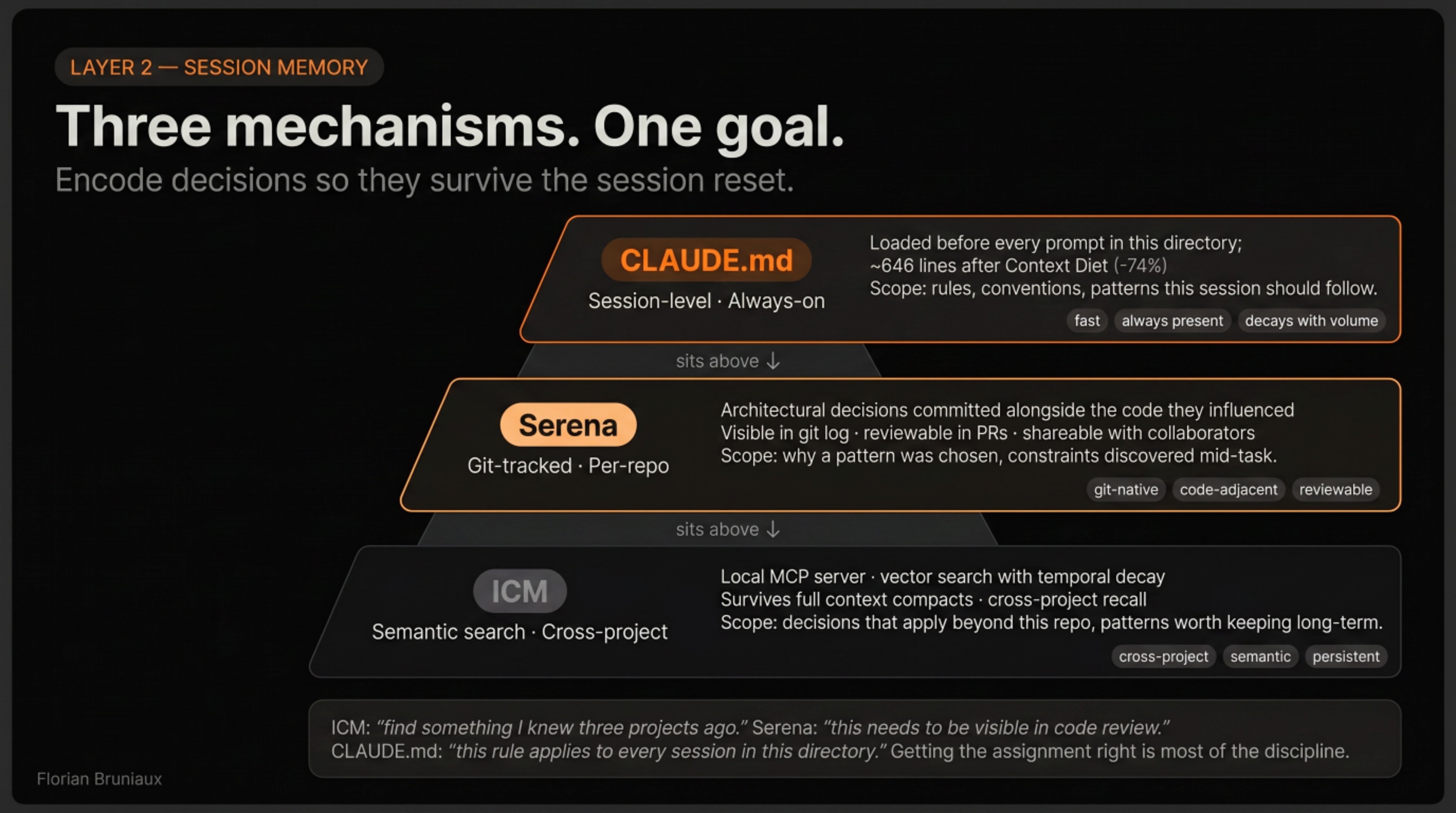
Most people discover CLAUDE.md as “the file Claude reads first.” Accurate, but incomplete. There are three levels, and the relationship between them shapes how context-efficient your setup can be.
The global level lives at ~/.claude/CLAUDE.md. Anything here applies across every project on your machine: your identity, your communication preferences, your general workflow conventions. Mine tells Claude I write in English, that I work across multiple projects simultaneously, and that I prefer feedback delivered without softening.
The project level lives at the root of your repository. This is where you describe the project: the stack, the architecture, the conventions that matter here and nowhere else. Most onboarding material focuses on this file because it’s the one that varies most between setups.
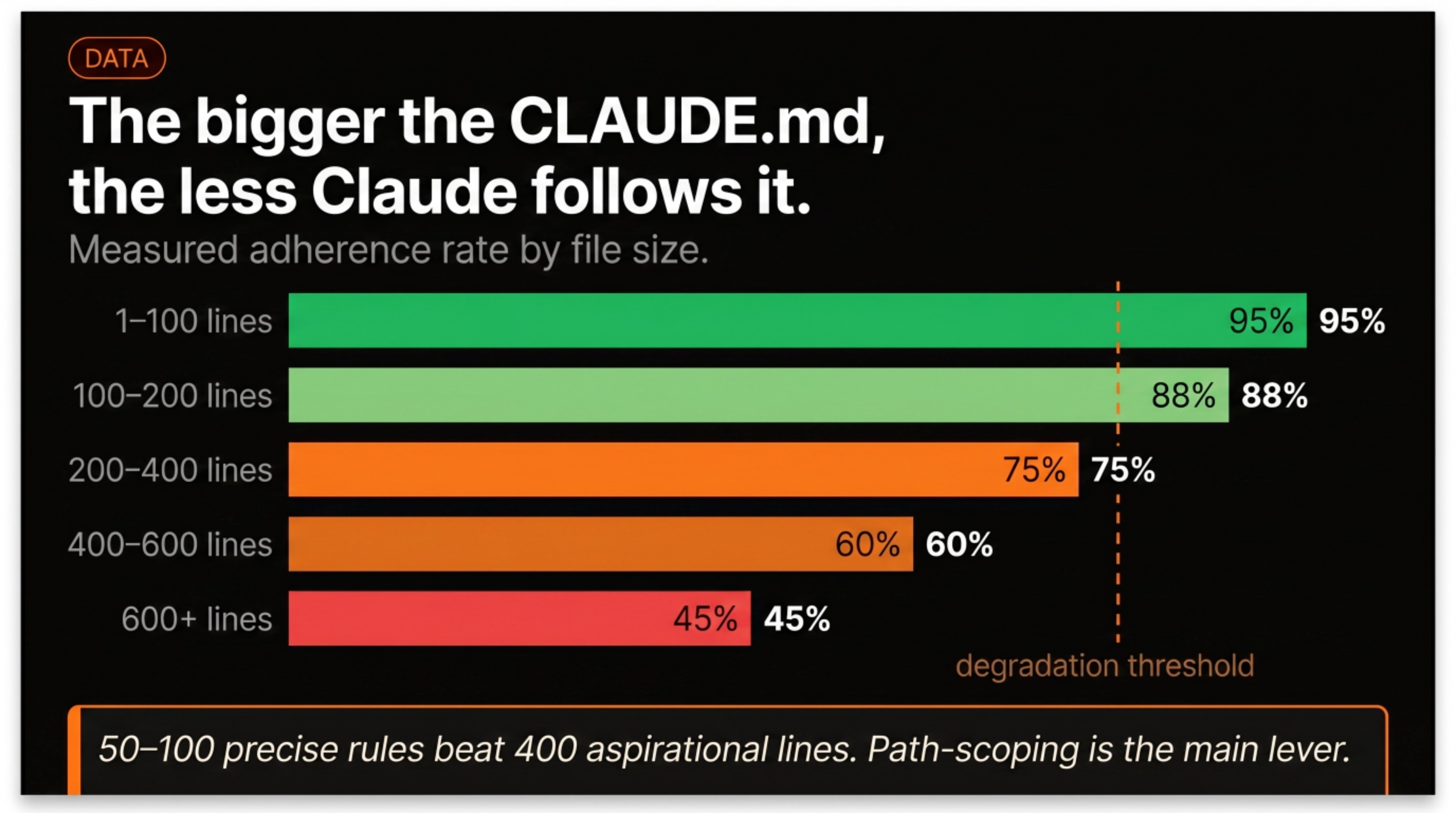
The third level is path-scoped rules: configuration files nested inside specific directories. A rules file in your api/ folder only loads when Claude is working on files in that folder. This is the part most people miss. If your backend rules are sitting in the root CLAUDE.md, Claude is reading them during every frontend session, burning context on information that doesn’t apply. Scoping rules to the directories where they’re relevant cuts always-on context by 40-50%.
Each level adds to the one above it. The global file sets defaults, the project file refines them, the path-scoped rules sharpen for the specific part of the codebase you’re working in.
The context window is a budget
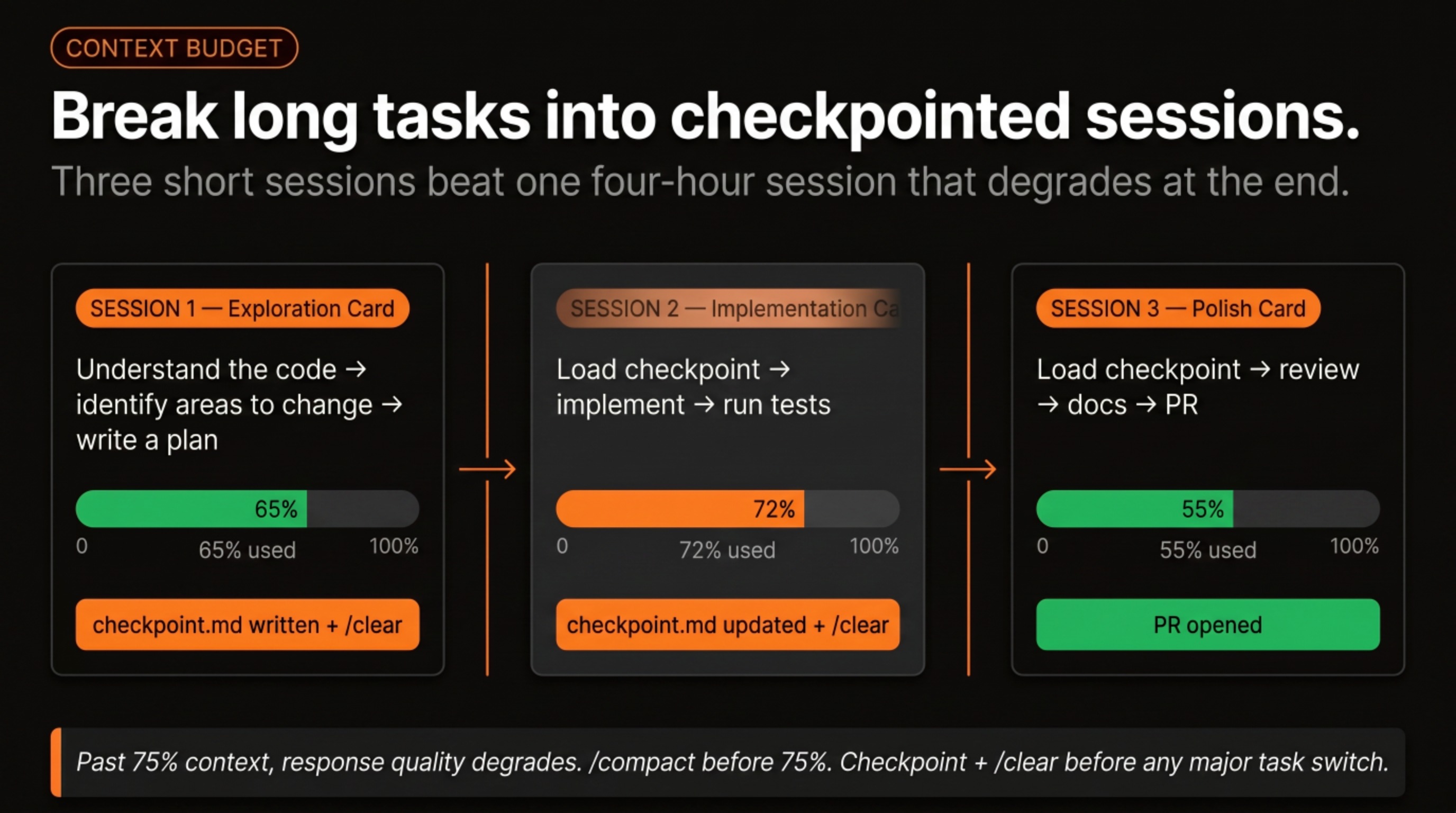
Claude Code runs on a 200K token context window. Everything counts against it: the config files that loaded at session start, the files Claude has read, the previous exchanges, the tool outputs. When the window fills, the session stops. But the more relevant constraint hits earlier, around 75%: past that point, responses start to degrade. Claude begins making inferences you didn’t ask for, ignores constraints from earlier in the conversation, occasionally contradicts decisions that were settled three exchanges back.
The two tools for managing this are /compact and /clear. Compact summarizes the conversation and drops the noise. Think of it as tidying a desk without leaving the room: the context you were building survives, but the working memory opens up. Clear resets the conversation entirely. You lose everything from the session, which is why the right habit is to write things down before clearing, not after.
Checkpoints before a /clear work like commits: write the current state, the decisions made, and the remaining tasks to a file. When you start the new session, load the checkpoint and confirm Claude understood it. You’re usually back to full operational context in two or three exchanges.
The longer a task, the more it needs to be decomposed. A well-decomposed task with several /clear checkpoints produces better results than the same task run as one long conversation that degrades toward the end. Product people tend to pick this up faster than developers, in my experience. They’ve been decomposing requirements into epics and stories for years, and that habit of structuring work into checkpointed steps turns out to be exactly the right mental model for managing a long Claude session.
Skills and commands are not the same thing
The distinction sounds small, but it changes how you design the setup.
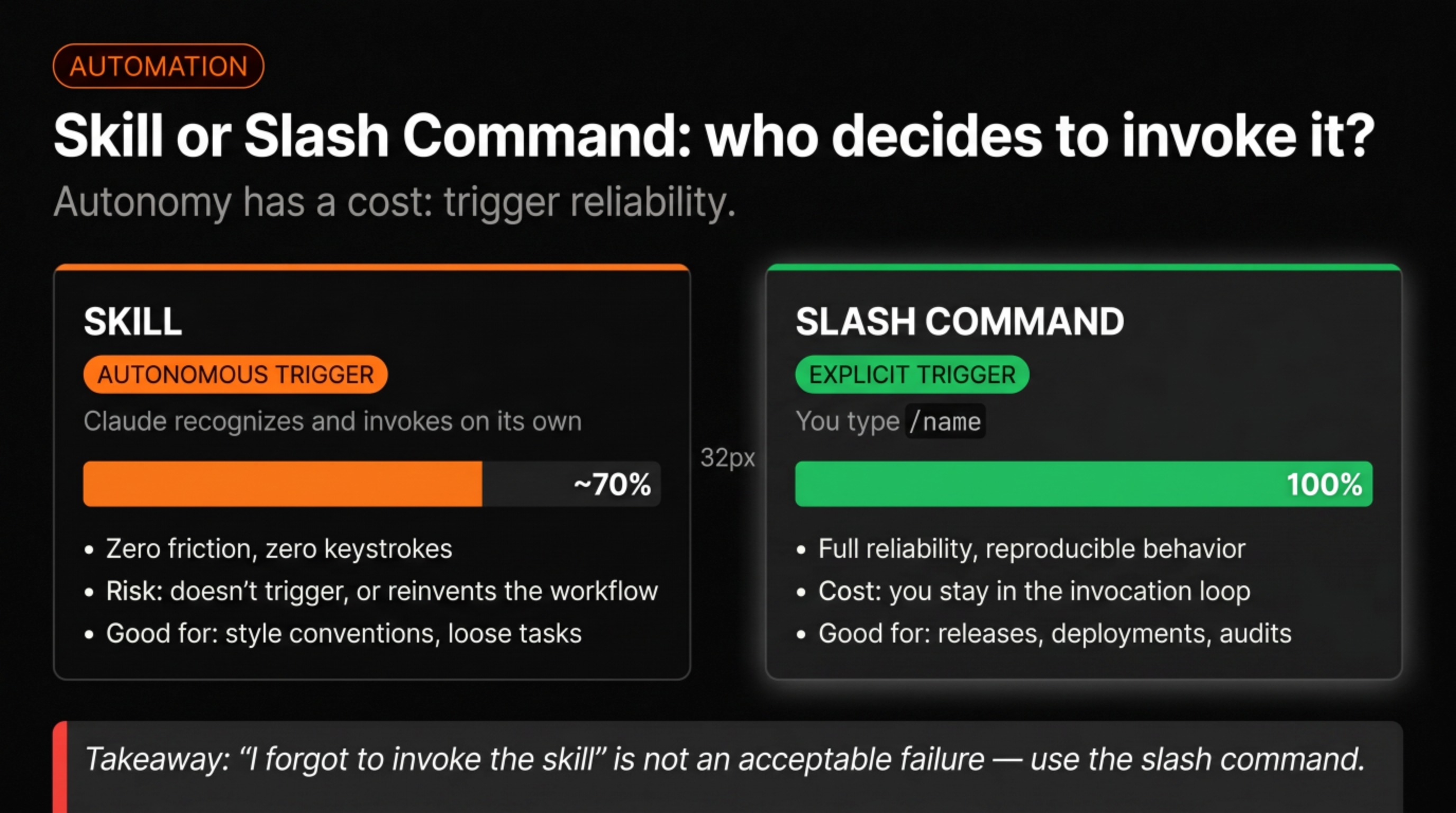
A skill is a specialized capability you give Claude that it’s supposed to recognize and use autonomously. You write a prompt that defines how to do a code review, for example, and Claude is supposed to invoke it any time a code review is needed. In practice, this works roughly 70% of the time. The other 30%, Claude either doesn’t recognize that the skill applies or reinvents the process from scratch, producing something technically acceptable but not done the way you actually want it done.
A slash command is different: you call it explicitly. You type /code-review and Claude executes that specific workflow. No recognition step, no inference about whether the skill is relevant. The tradeoff is that you’re now in the loop for triggering it, but that’s often exactly what you want for high-stakes operations, things like releases, deployments, or any process where “I forgot to invoke the skill” is not an acceptable failure mode.
Both can call agents, call each other, and specify which model to use. A changelog task probably doesn’t need Opus; a security audit does. The design choice of autonomous versus explicit trigger is the meaningful one, and getting it wrong is how you end up with Claude running processes you didn’t ask for.
Hooks are the only deterministic layer
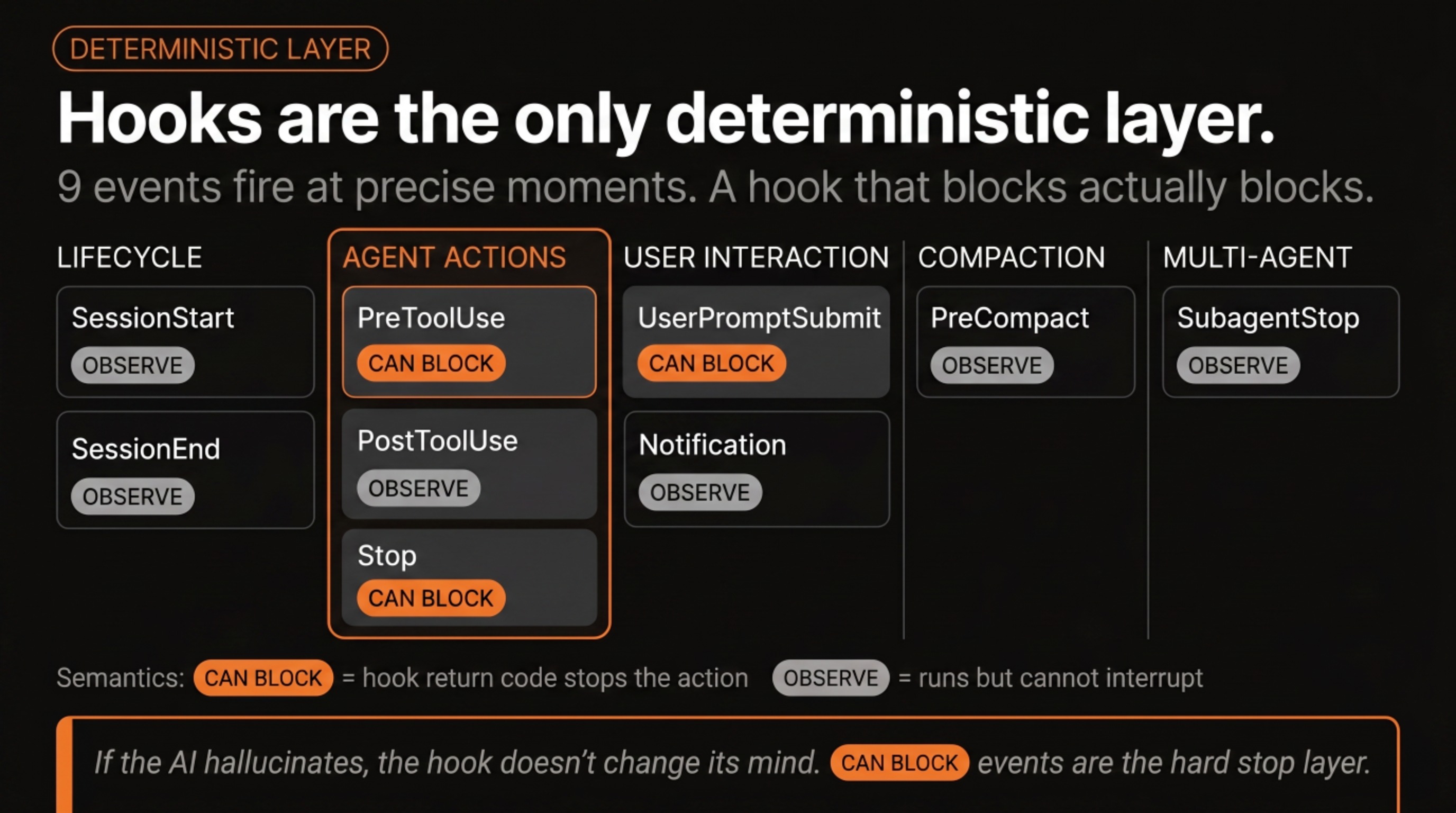
AI is non-deterministic. Submit the same prompt twice with identical context and you’ll get responses that differ in word choice, ordering, sometimes substance. That variability is mostly useful, but it creates problems in cases where a specific thing must happen every single time without exception. That’s what hooks exist for.
Hook events now number nine: lifecycle events (SessionStart, SessionEnd), agent actions (PreToolUse, PostToolUse, Stop), user interaction (UserPromptSubmit, Notification), compaction (PreCompact), and multi-agent coordination (SubagentStop). Each fires when the named event occurs and runs a shell command you define. The shell command can do anything: block the action, modify what Claude is about to do, write to a file, send a notification, run a test. Unlike the rest of Claude’s behavior, a hook runs 100% of the time. That’s the guarantee.
The most common first hook I’ve seen: a PreToolUse hook that prevents Claude from deleting or overwriting specific files. The hook checks what Claude is about to do, and if the target is a protected file, the hook blocks the action and returns an error message. Claude reads the error, adjusts its approach, and continues. About ten minutes to write, and it has prevented several incidents since.
Hooks can’t make Claude smarter or improve its judgment on genuinely ambiguous tasks. What they can do is intercept the specific moments where a bad call would cause irreversible damage. A config that relies entirely on Claude following instructions is hoping those instructions always register. The right hooks mean you don’t have to hope.
Agents can spawn agents, once
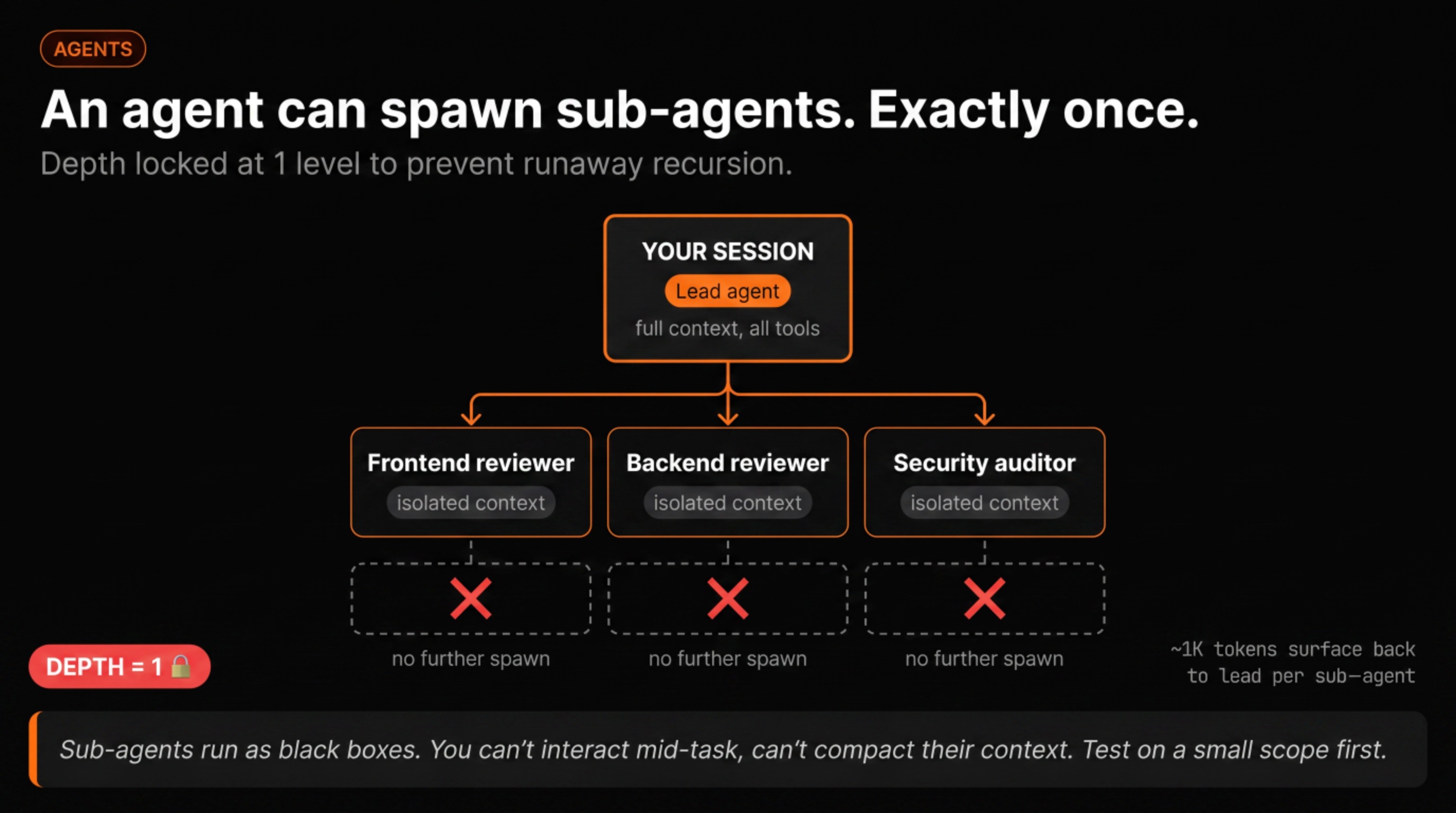
An agent is a specialized configuration: a prompt that defines a persona, a role, a set of tools, and optionally a specific model. Code reviewer, security auditor, documentation writer: each is a separate agent definition. Agents can be invoked by a slash command, by another agent, or explicitly mid-session.
The useful thing about agents is that they can spawn sub-agents. A team-lead agent can launch a frontend specialist, a backend specialist, and a security reviewer in parallel. Each runs its own session, produces its own report, and the team-lead consolidates the output. The key constraint: one level of depth. Sub-agents can’t spawn further agents, a deliberate safety limit to prevent runaway recursion.
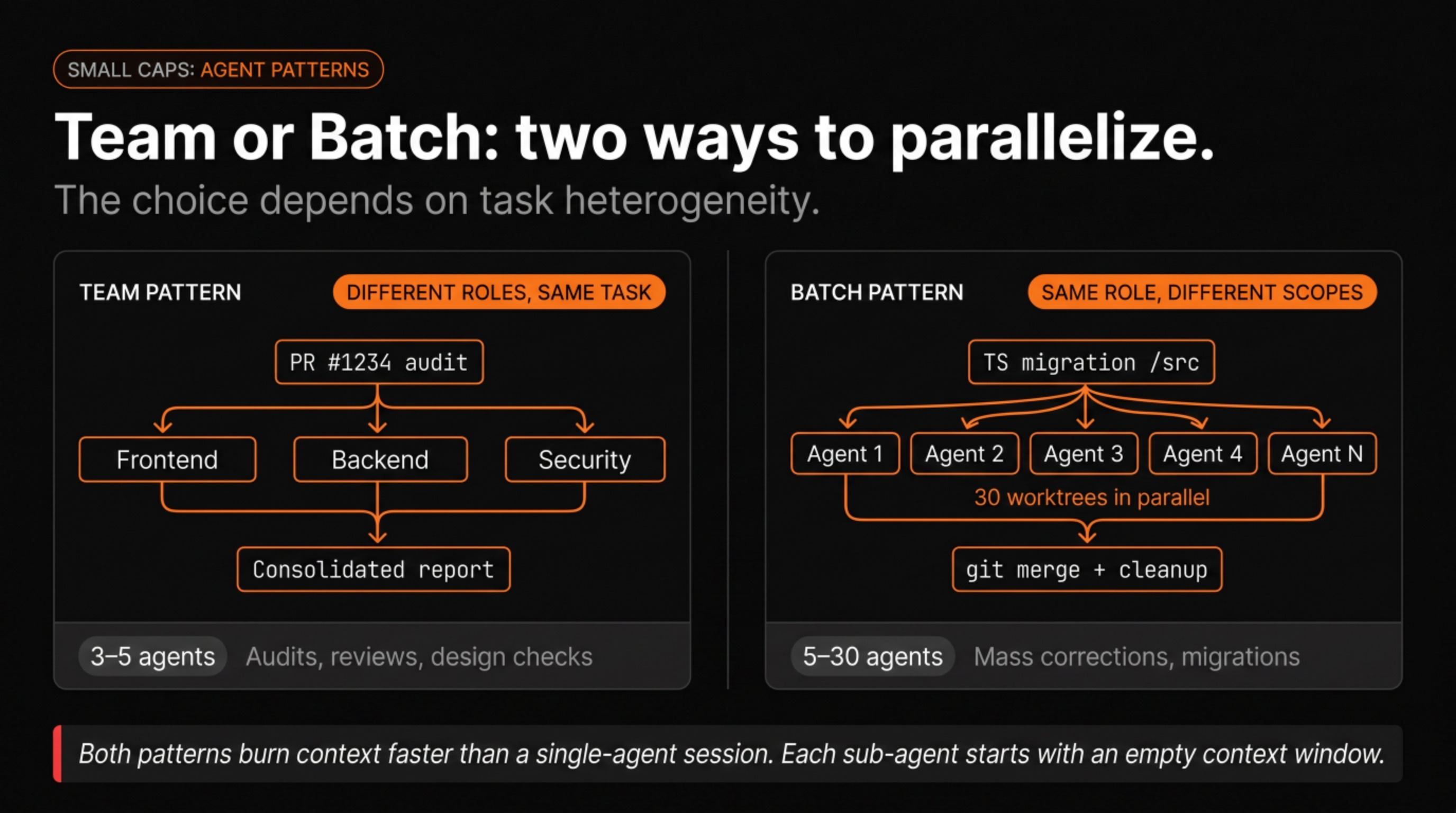
There are two useful patterns. The “team” pattern launches agents with different roles on different aspects of the same task; audits benefit most from this. The “batch” pattern runs multiple instances of the same agent at different scopes, which is what you want for mass corrections across a large codebase. Both burn context faster than a single-agent session, because each sub-agent has its own context window that doesn’t carry over to the others.
One thing worth knowing before you go in: sub-agents run as black boxes from your perspective. You can’t interact with them mid-task, you can’t compact their context, and if one goes sideways, you find out at consolidation. Test the pattern on a small scope before using it on something you can’t undo.
Plan Mode is algorithmically locked
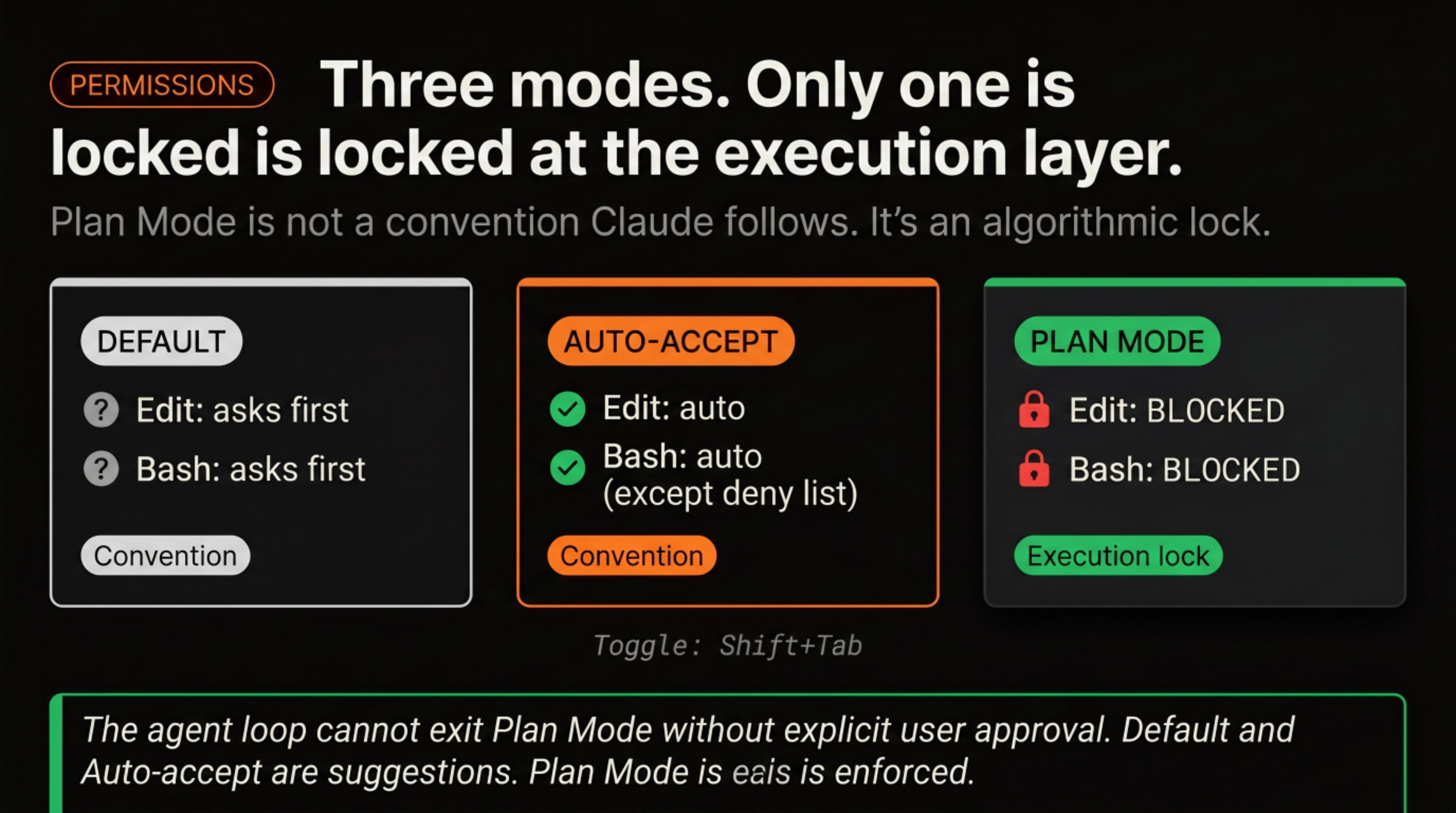
Three permission modes exist, and only one is enforced at the execution level.
Default mode: Claude reads and searches freely, but asks before any write, edit, or shell execution. It’s where most people start, and it stays workable for routine tasks, though it creates friction once you’re iterating fast.
Auto-accept (sometimes called yolo mode): Claude executes without asking. This is where the speed comes from, and also where incidents happen if the config doesn’t have enough guardrails. Most experienced users end up here for routine work after building enough trust in their hooks and rules.
Plan Mode is different from both. When it’s active (toggled with Shift+Tab in the terminal), Claude can read, reason, and produce a full plan, but it cannot alter a single file until you explicitly approve. This constraint is not a convention Claude follows; it’s enforced in the execution layer. The agent loop cannot exit Plan Mode without an explicit signal from the user. For complex tasks, for new contributors, or for anything where reviewing the proposed approach before consequences land matters more than speed, this is the mode to start in.
What nobody tells you
Three things that rarely appear in onboarding material.
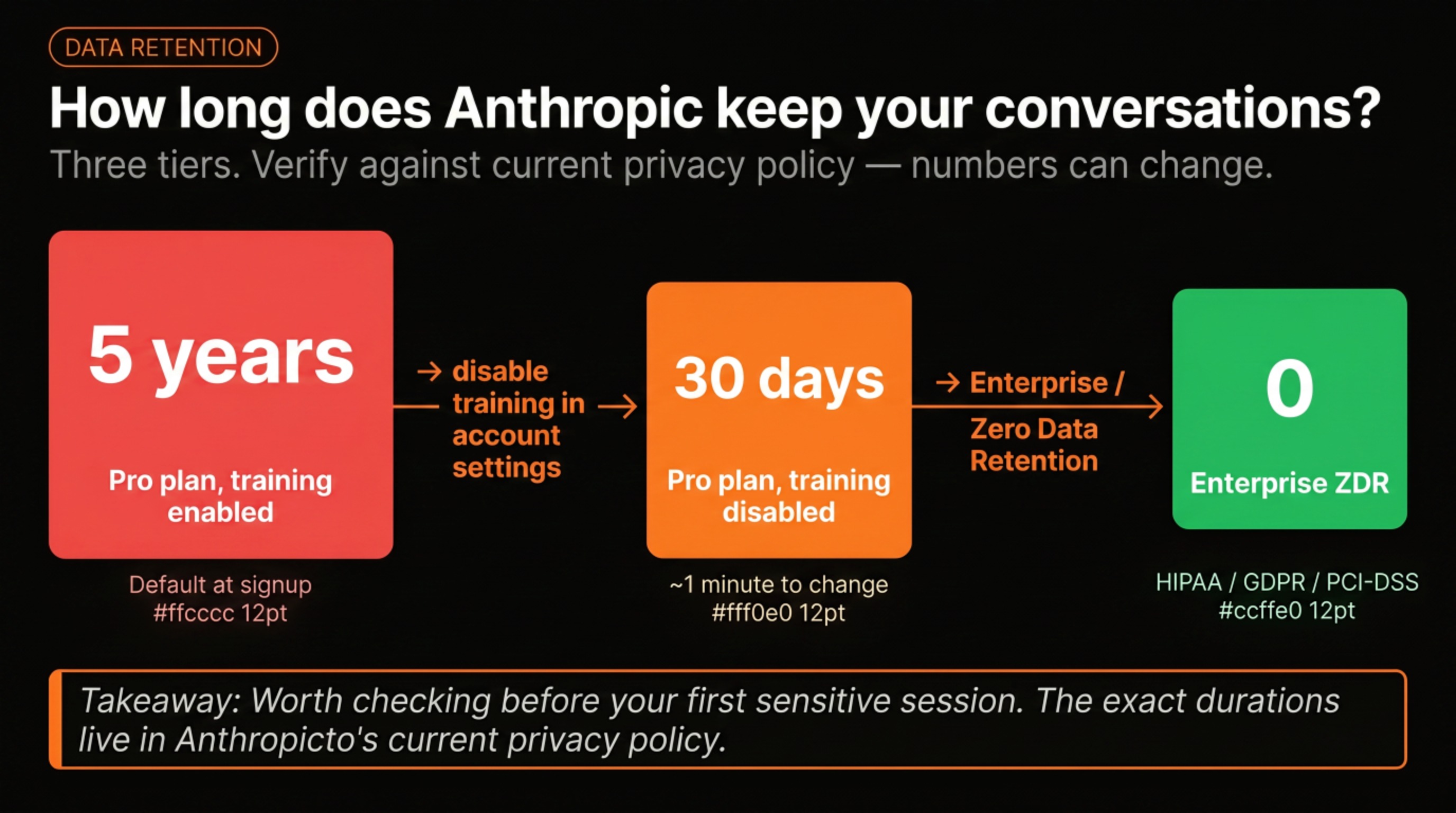
By default, Anthropic retains your conversation data for longer than most people assume. There’s a setting in your account that lets you reduce the retention window significantly. It takes about a minute to change, and it’s worth doing before you start putting anything sensitive through the tool. The exact durations are in their current privacy policy, which is worth reading once.
If you’re rolling out Claude Code to a team, watch for the API fallback setting. When a user hits their subscription limit, there’s an option to fall back to pay-per-token API automatically. A teammate of mine had this enabled without realizing it. A few days of normal usage generated a 300-400€ bill. Takes 30 seconds to check during rollout. Miss it and you find out from the invoice instead.
The third one is a role observation. At some point, if you’re running a non-trivial setup, you’ll find yourself spending a real fraction of your time on the configuration itself, not writing features, not reviewing code, but tuning rules, updating hooks, refining agents when the workflow changes. On my current setup, that’s somewhere between 30 and 50% of commits during active maintenance periods. Treating it as legitimate engineering work, rather than overhead to minimize, changes how you allocate time and who owns it on a team.
What’s next
These aren’t the only concepts, but they’re the ones where the gap between the surface-level understanding and the real behavior tends to cause the most friction early on.
If you’re still figuring out the right order to learn all of this, the onboarding map organizes it by week and links to the resources at each stage. This article assumed you’d already gotten past the vocabulary; that one tells you how to get there.
If you want to see what these mechanics look like in practice on a production codebase over seven months, Claude Is My Second Contributor covers the commit patterns, what Claude handles, and what remains human work.
One thing I still get wrong occasionally: deciding a task is simple enough to skip Plan Mode and being wrong about that. If you’ve developed a reliable heuristic for that call, I’d be curious to hear it.