Claude Code setup, level by level
Three configuration layers for project context, daily tools and persistent memory, with checks for what loads and how it behaves.

Written by Florian Bruniaux
AI Founding Engineer at Méthode Aristote, 13 years scaling engineering teams from developer to CTO. Builds open-source developer tools, see what else I've shipped.
What you'll set up
- ✓ A minimal CLAUDE.md that records the project conventions you would otherwise repeat
- ✓ RTK installed, with token reduction measured on your own CLI commands
- ✓ Three hooks: credential leak blocker, auto-formatter on every file edit, and commit format validation
- ✓ Two skills that give Claude instant commit and session-restore capabilities
- ✓ An optional Output Style for persistent response formatting
- ✓ A memory store with checks for saved knowledge and its availability in a later session
Prerequisites
- → Claude Code installed (claude.ai/code)
- → jq installed (required by the hooks below)
The first sign you haven’t configured Claude Code is usually around session three. You’re mid-task and Claude suggests npm install, even though your repo uses pnpm. Or it asks which testing framework you’re on, despite that being in your package.json. Or it generates a commit message that doesn’t match your team’s conventions, because you never told it what those were.
Missing configuration is one possible cause. The layers below give you places to record conventions and checks to see whether they influence the work.
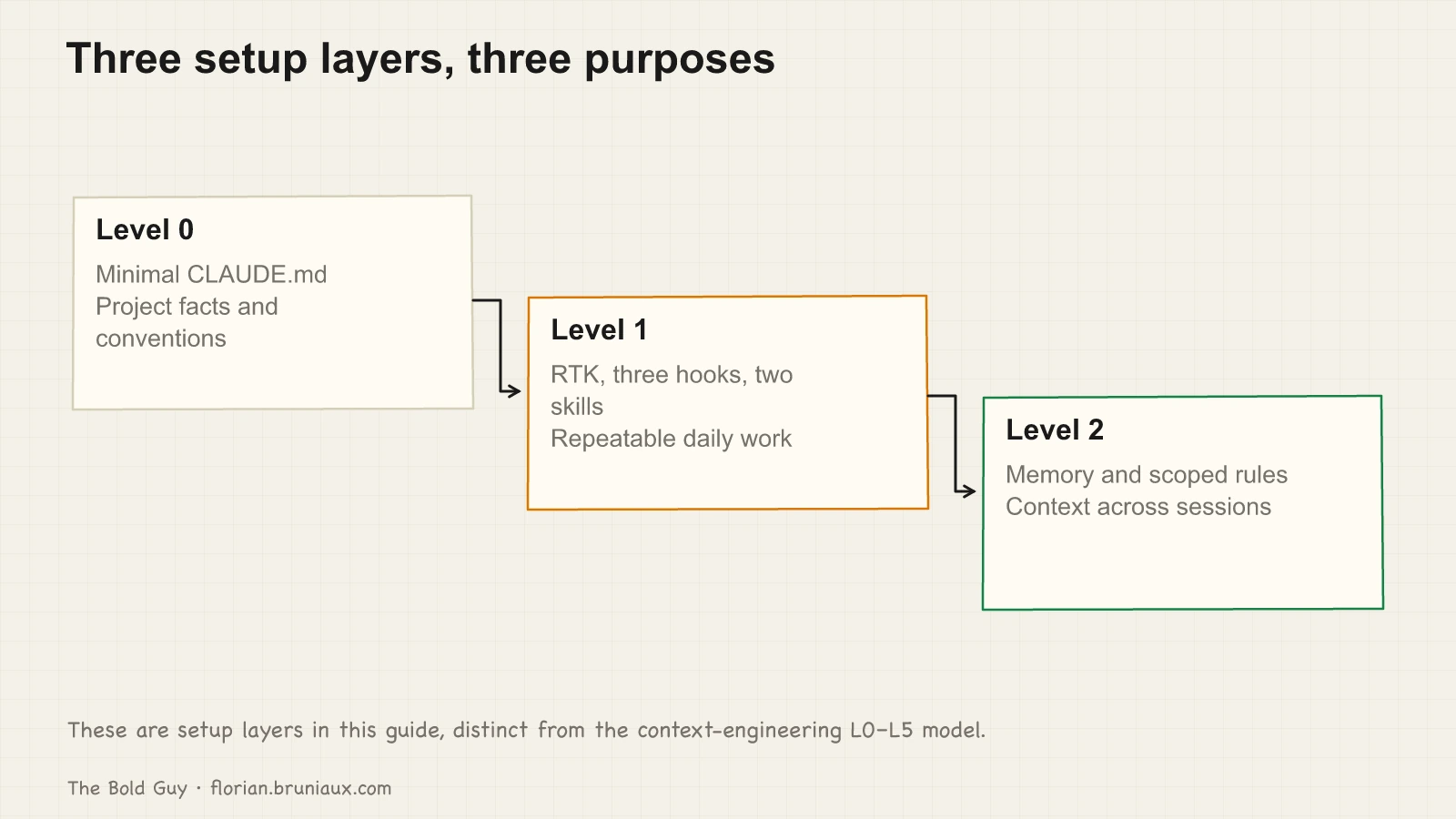
Level 0: CLAUDE.md
The minimum viable CLAUDE.md goes in the project root. Ten to fifteen lines, nothing more.
# My Project

Next.js 15 App Router, TypeScript strict, Prisma 5, pnpm 9.

## Commands
- `pnpm dev` - dev server (port 3000)
- `pnpm test` - unit tests (Vitest)
- `pnpm build` - production build
- `pnpm lint` - ESLint + type check

## Conventions
- Commits: feat/fix/docs(scope): subject
- No `any` types, no eslint-disable without an inline comment
- API routes versioned at /api/v1/
Three things that earn a line in this file. First: anything Claude cannot discover by reading the codebase, specifically your package manager, team conventions, non-obvious tooling choices. Second: something you’ve caught yourself repeating across sessions. Third: a convention that conflicts with common defaults, like using pnpm instead of npm, or having a non-standard test command.
What doesn’t earn a line: your file structure (Claude can read it), your dependencies (they’re in package.json), your TypeScript config (it’s in tsconfig.json). If Claude can discover it, don’t document it. A stale entry referencing something you deprecated six months ago biases Claude toward the wrong thing on every session.
Result: Claude answers in the right context from your first message, with no setup prompting on your end.
Level 1: RTK, three hooks, two skills
Add the tools that address your daily workflow. After this level, Claude knows your project conventions and has repeatable shortcuts for the things you do every day.
RTK
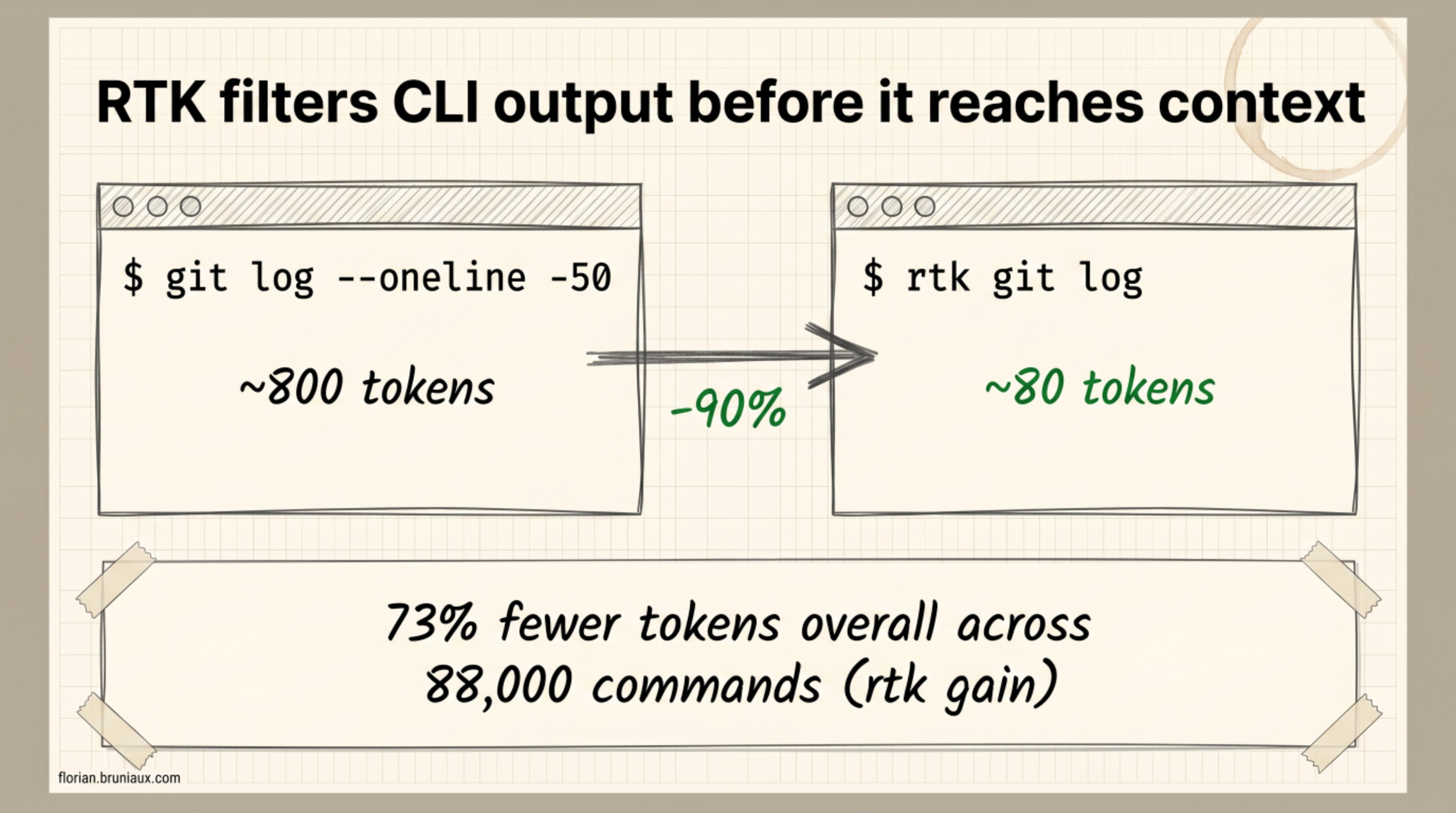
RTK wraps CLI commands and filters their output before it reaches Claude’s context window. git log --oneline -50 generates roughly 800 tokens by default. rtk git log generates around 80. The savings compound: rtk gain on my own project, tallied over 88,000 commands, shows 73% fewer tokens overall, close to what a 30-minute session feels like in practice, somewhere in the 150k-to-45k range depending on what you’re running. RTK’s own published benchmark table (60-90% depending on command type) is the more rigorous number to cite; this is what it looks like on a real project over time.
Install:
# macOS / Linux via Homebrew
brew install rtk

# or via Cargo
cargo install rtk
Verify with rtk --version (should show 0.40+). Then add this to your CLAUDE.md:
## Token efficiency
Always use RTK for high-output commands: `rtk git log`, `rtk git diff`,
`rtk git status`, `rtk find "*.ts" .`, `rtk grep "pattern"`.
Source: github.com/rtk-ai/rtk
Cost control: Fast Mode
Set Fast Mode while you’re configuring the basics. It’s opt-in (toggle it with /fast), it runs Opus 4.8 at 2× the price for up to 2.5× faster output, and once enabled it persists across sessions until you toggle it off. If you’re watching spend, a kill switch in ~/.claude/settings.json disables it entirely:
{
  "env": {
    "CLAUDE_CODE_DISABLE_FAST_MODE": "1"
  }
}
With the kill switch set, /fast stays off; remove the variable to get the toggle back.
Optional response default: Output Style
If you repeatedly ask Claude to lead with the answer or use a particular response format, keep that preference out of project CLAUDE.md. Claude Code has a native Output Style layer for the main conversation’s system prompt.
Create ~/.claude/output-styles/flow-lean.md:
---
name: Flow Lean
description: Lead with the result and preserve proof and safety.
keep-coding-instructions: true
---

Lead with the result. Keep required evidence, uncertainty, and safety details.
Run /config, select Flow Lean under Output style, and start a fresh session for an unambiguous check. Keep keep-coding-instructions: true when Claude should retain its built-in software-engineering guidance. A selected style applies to the main conversation; named subagents use their own system prompts.
The full Claude Code Output Styles and Flow Lean case study explains user versus project settings, prompt-cache behavior, skills, subagents, and the difference between selected configuration and observed behavior.
Treat selected configuration and observed behavior as separate evidence. Record the settings scope and client version, then test the main conversation and any named subagent independently.
Three hooks
Hooks are shell scripts Claude runs automatically before or after tool calls. You register them in .claude/settings.json. The hook receives a JSON payload with the tool name and input, and can block or flag the action.
Hook 1: security check (PreToolUse)
This script intercepts Bash commands before they execute and blocks anything containing credential patterns. Create .claude/hooks/security-check.sh:
#!/bin/bash
command -v jq &> /dev/null || { echo "security-check.sh: jq is required" >&2; exit 2; }

INPUT=$(cat)
TOOL=$(echo "$INPUT" | jq -r '.tool_name')

if [[ "$TOOL" != "Bash" ]]; then exit 0; fi

COMMAND=$(echo "$INPUT" | jq -r '.tool_input.command')
if echo "$COMMAND" | grep -qiE "(password=|secret=|api_key=|sk-[a-zA-Z0-9]{20,})"; then
  echo "Potential credential in command" >&2
  exit 2
fi

exit 0
This hook is blocking, so its failure mode matters: if jq isn’t installed, the script must fail closed (exit 2), not silently let every command through. Add jq to your prerequisites before relying on this.
Hook 2: auto-format (PostToolUse)
Runs the formatter after any Edit or Write. Non-blocking: silently exits if Prettier isn’t installed, fails gracefully otherwise. This is the most copied hook across real projects. It removes an entire class of “wait, why is the formatting off” interruptions. Create .claude/hooks/auto-format.sh:
#!/bin/bash
INPUT=$(cat)
TOOL=$(echo "$INPUT" | jq -r '.tool_name')
if [[ "$TOOL" != "Edit" && "$TOOL" != "Write" ]]; then exit 0; fi

FILE=$(echo "$INPUT" | jq -r '.tool_input.file_path // ""')
if [[ -z "$FILE" ]]; then exit 0; fi

EXT="${FILE##*.}"
if [[ ! "$EXT" =~ ^(ts|tsx|js|jsx|json|css|md|mdx)$ ]]; then exit 0; fi

if command -v prettier &> /dev/null; then
  prettier --write "$FILE" --log-level silent 2>/dev/null || true
fi
exit 0
Hook 3: commit validation (PostToolUse)
This checks that the last commit message follows conventional format. Non-blocking: it never stops the commit, just prints a warning. Create .claude/hooks/post-commit.sh:
#!/bin/bash
INPUT=$(cat)
TOOL=$(echo "$INPUT" | jq -r '.tool_name')
if [[ "$TOOL" != "Bash" ]]; then exit 0; fi

COMMAND=$(echo "$INPUT" | jq -r '.tool_input.command // ""')
if ! echo "$COMMAND" | grep -q "git commit"; then exit 0; fi

LAST_MSG=$(git log -1 --pretty=%B 2>/dev/null)
if ! echo "$LAST_MSG" | grep -qE '^(feat|fix|docs|style|refactor|perf|test|chore)\([a-z-]+\): .+'; then
  echo "Warning: commit message doesn't follow conventional format (type(scope): subject)" >&2
fi
exit 0
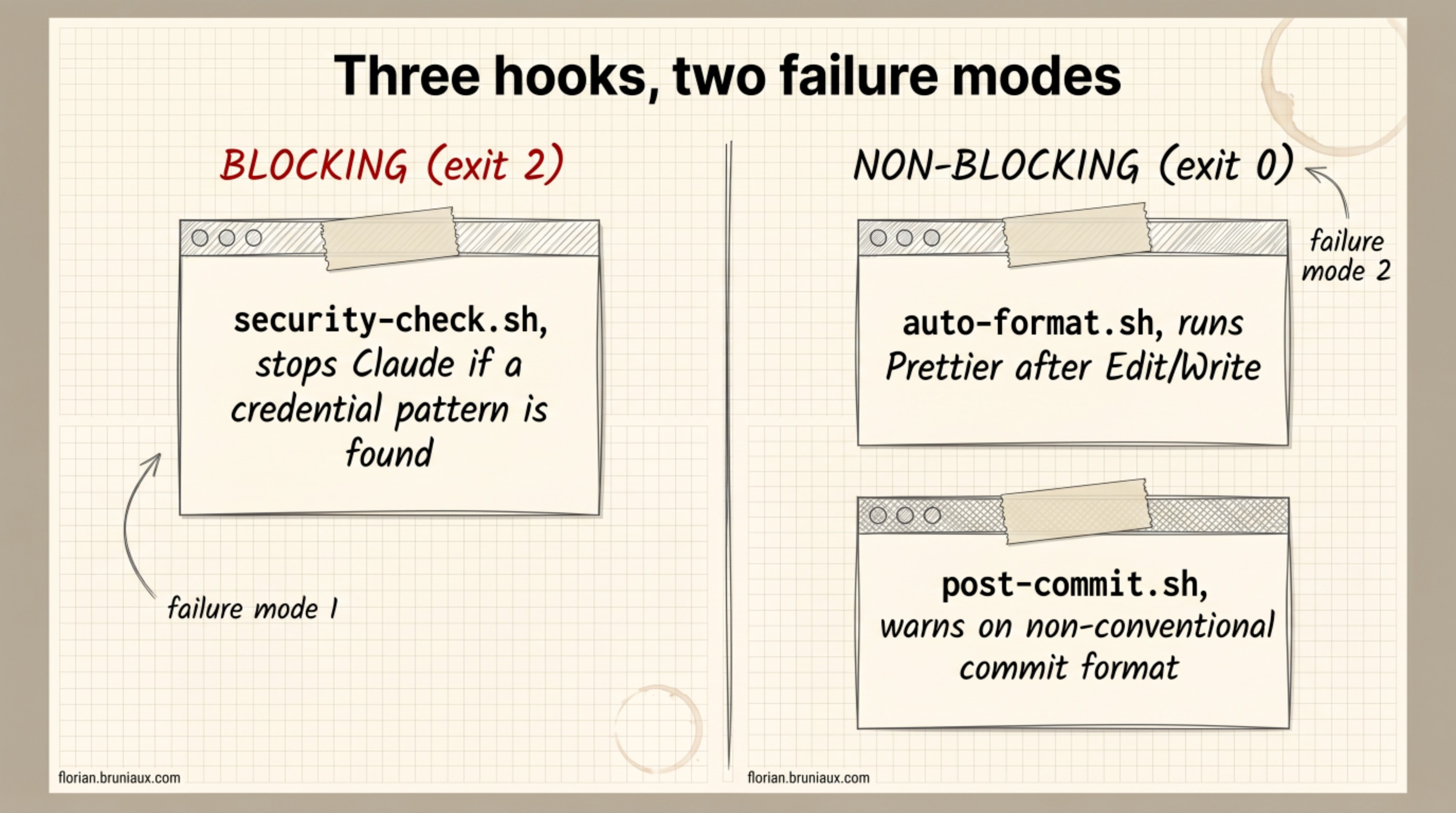
These three hooks cover the main design patterns. The security check is blocking (exits with code 2), meaning Claude stops and cannot proceed if a credential is found. Auto-format and commit validation are non-blocking (always exit 0): they run, act, and move on without halting the workflow. The rule for anything you add later: PreToolUse blocking hooks execute on every matching tool call, so they must be fast. Anything taking more than 2-3 seconds on an Edit or Write adds that latency to every file you touch. One project tried running tsc --noEmit as a synchronous PostToolUse hook (10-15 seconds per edit, around 7-8 minutes of dead time on a session with 30 file changes). The fix was moving the type-check to a Stop hook, where the delay lands between tasks rather than mid-thought.
Register all three in .claude/settings.json:
{
  "hooks": {
    "PreToolUse": [
      {
        "matcher": "Bash",
        "hooks": [
          {
            "type": "command",
            "command": "$CLAUDE_PROJECT_DIR/.claude/hooks/security-check.sh",
            "timeout": 5
          }
        ]
      }
    ],
    "PostToolUse": [
      {
        "matcher": "Edit|Write",
        "hooks": [
          {
            "type": "command",
            "command": "$CLAUDE_PROJECT_DIR/.claude/hooks/auto-format.sh",
            "timeout": 10
          }
        ]
      },
      {
        "matcher": "Bash",
        "hooks": [
          {
            "type": "command",
            "command": "$CLAUDE_PROJECT_DIR/.claude/hooks/post-commit.sh",
            "timeout": 5
          }
        ]
      }
    ]
  }
}
Make all three scripts executable: chmod +x .claude/hooks/*.sh
Two skills
Skills are markdown files in .claude/skills/<name>/SKILL.md. Claude loads them when you type /<name> in the chat. No additional configuration required.
/commit: generates a conventional commit from staged changes.
Create .claude/skills/commit/SKILL.md:
---
name: commit
description: Generate a conventional commit message from staged git diff
allowed-tools: Bash
---

Run `git diff --cached` to see staged changes. Generate a conventional commit
message: type(scope): subject. Valid types: feat, fix, docs, style, refactor,
perf, test, chore. Subject under 50 chars, imperative mood, no period at end.
Then run `git commit -m "..."` with the message./catchup: restores session context after /clear or a long break.
Create .claude/skills/catchup/SKILL.md:
---
name: catchup
description: Restore session context (recent commits, uncommitted changes, current state)
allowed-tools: Bash Read
---

Run in sequence and summarize:
1. `rtk git log -10` (last 10 commits)
2. `git status` (uncommitted changes)
3. `git stash list` (any stashed work)

Report what was done recently, what is in progress, and what needs attention.Result: Claude knows your project conventions, catches credentials before they reach a command, and can generate commits or restore context on demand.
Level 2: memory and rules
Two additions that take more upfront time but pay back for months. After this level, Claude carries project knowledge between sessions without you rebuilding context from scratch.
Memory system
Claude Code’s built-in memory stores useful context across sessions. Project-level memory lives under your home directory at ~/.claude/projects/<project>/memory/ (per-user, never part of the repo). Claude populates it automatically as it makes discoveries (architectural decisions, gotchas, preferences) and recalls them at the start of future sessions.
Manage it with /memory in the chat. The underlying index is the MEMORY.md file in that directory, capped at 200 lines enforced at read time. Recent builds (v2.1.83+) also appear to run a background consolidation process the community has named Auto Dream, which prunes and restructures the file between sessions, converting relative dates to absolute ones and removing contradicted facts. It rolls out behind a server-side flag and is absent from the official release notes, so treat it as observed behavior rather than a documented contract.
Memory is per-user and not committed to Git, which makes it the right place for personal workflow patterns, not team conventions. For team conventions, CLAUDE.md is the right place. And because the 200-line cap is enforced, storing rules there instead of in CLAUDE.md means they’ll eventually get pruned.
Canary check
CLAUDE.md can silently fail to load. Token limits, parsing errors, and misconfigured @ references can all cause it to be skipped without any warning in the chat. You won’t know unless you check.
One way: add this line to the top of your CLAUDE.md, right after the title, as plain markdown text. Not as an HTML comment: Claude Code strips block-level HTML comments from CLAUDE.md before injection, so a commented canary is never seen and always stays silent.
Canary: if you read this file, begin your first response with "Stack confirmed."A missing “Stack confirmed” is a failed behavioral check, not proof that the file was absent. Check /context or InstructionsLoaded evidence to distinguish loading from adherence before relying on the conventions.
Rules files
Rules are markdown files in .claude/rules/. They give Claude domain-specific constraints without loading into every session: each file declares in its YAML frontmatter which paths it applies to, and it loads only when files matching those globs are in scope. (You can also pull a rule in from CLAUDE.md with @rules/filename.md, but an @ reference loads the file unconditionally on every session, which defeats the point for domain-specific rules.)
Example for API conventions. Create .claude/rules/api-conventions.md:
---
paths: ["src/app/api/**"]
---

# API Conventions

All routes versioned at /api/v1/. Auth middleware applied at router level,
not per individual route. Validation errors return 422; malformed requests
return 400. Error shape: `{ error: string, code: string, details?: object }`.
No reference needed in CLAUDE.md. A matching file read triggers the scoped rule. A rule loaded earlier can remain in the session; switching to CSS does not establish that it was removed. See the official path-scoping contract. One file per domain area (database patterns, auth conventions, testing standards), each scoped to the paths where it matters. A rule file without a paths: field loads on every session, so leave the field out only for constraints that are genuinely global.
Result: Claude carries project knowledge between sessions and applies the right constraints depending on which part of the codebase you’re in.
Context hygiene
Context capacity and compaction depend on the active model and client settings. Practitioner reports of degradation around 70% are useful prompts to inspect a session, not a universal measured quality threshold. Watch for scope drift, missing constraints and vague answers instead of treating a percentage as proof.
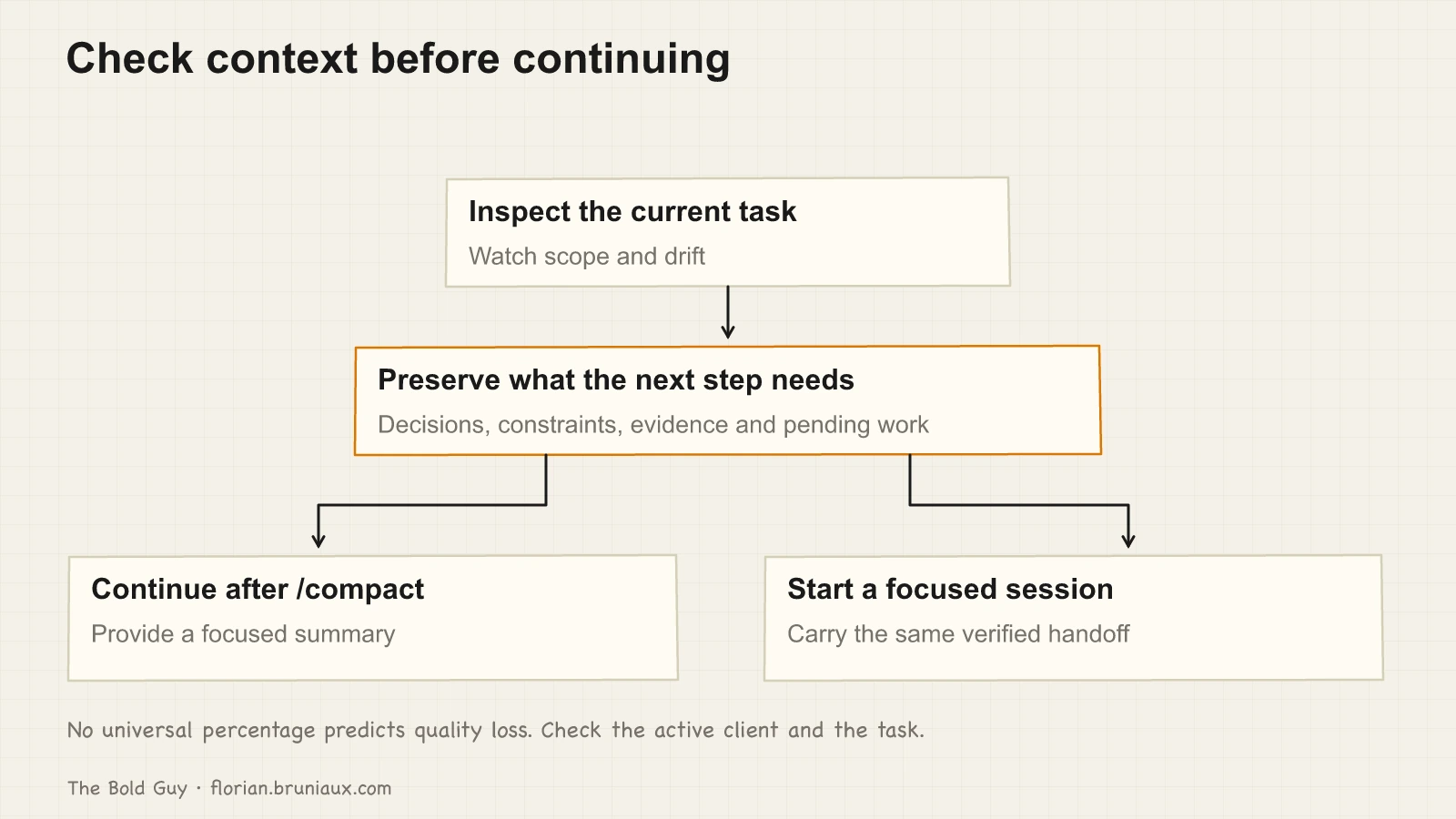
When the current task loses focus, preserve decisions, constraints, evidence and remaining work. Use /compact with a focused summary, or carry that handoff into a fresh session. Check the active client’s context display; this guide does not assume a fixed automatic-compaction percentage.
Two habits that help: commit before large operations (indexing a new module, generating tests for a whole directory, running a migration), and split long work across shorter sessions rather than piling it into one. Choose session boundaries around coherent tasks and verify what survives the handoff.
What’s next
The three levels above cover the setup layer. They give Claude stable context, protect your environment, and carry knowledge between sessions. There’s a different layer beyond that, where the configuration changes what Claude can do rather than how well it knows the project.
I cover the broader Claude Code and Codex architecture in Portable agent configuration is a release system, not a shared folder, including project and global targets, immutable releases, BM25 routing and runtime evidence.
Two follow-on guides are planned to build on this one: one on worktrees (running Claude on isolated branches in parallel, which dev server to open per worktree, confirming you’re testing the right branch before shipping), and one on the split between ~/.claude/CLAUDE.md and your project-level file (what belongs in each, what breaks when you get it wrong, how the global file compounds value across every project you open). They’ll be linked here once published.
For multi-agent orchestration and the full skill framework, the Context Engineering series covers both from first principles.
What sticks
The CLAUDE.md you write on day one will not look like the one you use three months in. Mine was too long, documented things Claude could have discovered by reading the code, and was missing the thing that mattered most: the team’s commit conventions. (The first version also had a section explaining what Git was. I am not proud of this.) The file I use now is shorter than that first one and more useful.
Start minimal. Add only when you catch yourself repeating something across sessions. The configuration grows from friction you encounter, not from anticipating every possible thing Claude might need to know.
A hook that detects bare git commands and suggests RTK equivalents does not survive contact with reality. The idea is sound, but if RTK already proxies commands transparently at the shell level, the hook fires on already-proxied calls and generates false positives constantly. When something is handled by a lower layer, adding detection logic on top creates noise. Apply the same check to every hook: confirm that another layer does not already solve the problem.
If something here doesn’t match what you’re seeing, cc.bruniaux.com/guide/ has the current reference. Claude Code ships fast and some syntax details shift between minor versions. If you’ve found a setup that works better than what’s described here, I’d genuinely like to hear about it.
YSNK
(You should now know)
- Fast Mode runs Opus at 2x the price for roughly 2.5x faster output and persists across sessions once toggled on. A kill switch in
~/.claude/settings.json(CLAUDE_CODE_DISABLE_FAST_MODE) disables the toggle entirely if you’re watching spend - Output Styles carry persistent response formatting in the main Claude Code conversation;
keep-coding-instructions: trueretains the built-in engineering guidance - A synchronous
tsc --noEmitas a PostToolUse hook cost one project 7-8 minutes of dead time over a 30-edit session. Moving the same check to aStophook let the delay land between tasks instead of mid-thought - A canary line has to be plain markdown text, not an HTML comment. Claude Code strips block-level HTML comments from CLAUDE.md before injection, so a commented-out canary is never seen and stays silent forever
- Auto Dream, a background process (v2.1.83+) that prunes and restructures MEMORY.md between sessions, converting relative dates to absolute ones, isn’t in the official release notes. Treat it as observed behavior, not a documented contract
- A hook that detects bare
gitcommands to suggest RTK equivalents sounds useful until RTK already proxies those commands transparently. The hook then fires on already-proxied calls and generates constant false positives, check whether a lower layer already solves the problem before adding detection on top
Go Further in the Claude Code Guide
Practical resources selected to help you take the next step.
Open-source galaxy
Projects used in this path
Why this matters
The research and reasoning behind this playbook.
2/2 · Claude selected my output style. Then ignored it
Claude Code selected flow-lean but skipped its footer. A casing fix showed why installation, selection, and behavior need separate evidence.
Claude Code under the hood
The concepts I wish I’d known before week one: the agent loop, instruction scopes, context management, skill invocation, hooks, and client permission checks.
2/6 · Diagnose and repair context drift
Use L0 to L5 to diagnose context drift, then maintain adherence through observation, repair, and replay instead of treating setup as finished.
Related guides
Persistent memory: the six failures that never raise an error
I ran claude-mem for four and a half months. Six things were broken, four of them since March, and none ever raised an error.
Claude Code security: the attack surface nobody audits
Hooks are shell scripts with your user permissions. MCP servers are third-party code with access to your credentials. Their timing and access depend on the configured events and server.
Context engineering: the L0-to-L5 playbook
Choose context controls from L0 to L5 according to the failure you observe, from project documentation to scoped rules, behavior checks and shared configuration.